 Photo by Dominik Scythe on Unsplash
Abstract
What do you get when you mix Spring AI, RAG, and a bored LLM persona? The most overqualified commentator in tic-tac-toe game history.
Whatever you personally feel about modern AI — its encroach on our lives, and it’s more than questionable sourcing of the corpus of human knowledge and creativity to enrich the few, it’s theft of our favorite words like “vibes”, the genie is out of the bottle —it’s here to stay.
It’s not lost on me that as I write this, that some AI bot is planning to scan this text, incorporate it in its vectors and slither away to another article to consume some more and repurpose it probably without attribution.
So I’ve had enough! Join me as I lead the human fight-back and force AI to finally do the things we actually don’t want to do, like commentate on over-engineered games of tic-tac-toe. I can’t promise you riches but I can promise you RAGs!
This is a spiritual epilogue for the concluded multi-part series: Road to JDK 25 — Over-Engineering Tic-Tac-Toe. We had been progressively over-engineering tic-tac-toe (available at the overengineering-tictactoe GitHub repository: here) focused on using finalized features in JDK releases. In this article we start a venture into modern AI concepts with a complete introduction to using Spring AI with Java.
When we featured JDK 24 we introduced stream gatherers by developing commentary and post-game analysis personas. This gave us some basic commentary like this during the game:
"O seizes the high ground, taking control of the critical center square - textbook tic-tac-toe strategy!"
and this post-game:
"After the 1st move X seized the high ground - in textbook tic-tac-toe strategy by taking control of the critical center square."
"With the 4th move of the game O made a critical defensive play that prevented an immediate loss. Clutch!"
If you’ve ever played any video game with commentary, though, there’s nothing that breaks the immersion more than when the commentator repeats the same phrases again and again, making it feel artificial. This is an area where LLMs (Large Language Models) with Generative AI can come in handy — more Holly, the hilariously deadpan British ship’s computer from ‘Red Dwarf’ with an IQ of 6000, less ‘Everybody’s dead, Dave’ on repeat. LLM models rarely repeat themselves using the exact same phraseology since they can be tuned for temperature/creativity.
Springing into AI
Spring is a Java framework heavily used in the enterprise that simplifies the setup and integration of both closed/open source modules to create applications. Spring Boot simplifies that process further adding common sense, opinionated default configurations. Finally, Spring AI provides a set of abstractions for interacting with AI models and has a quick-start guide here.
We can begin at https://start.spring.io where we’ll setup the initial project. We will be using Ollama in order to use offline (local) models. Unless you have a lot of compute power, though — these will run slower than the online models but that’s fine for now.
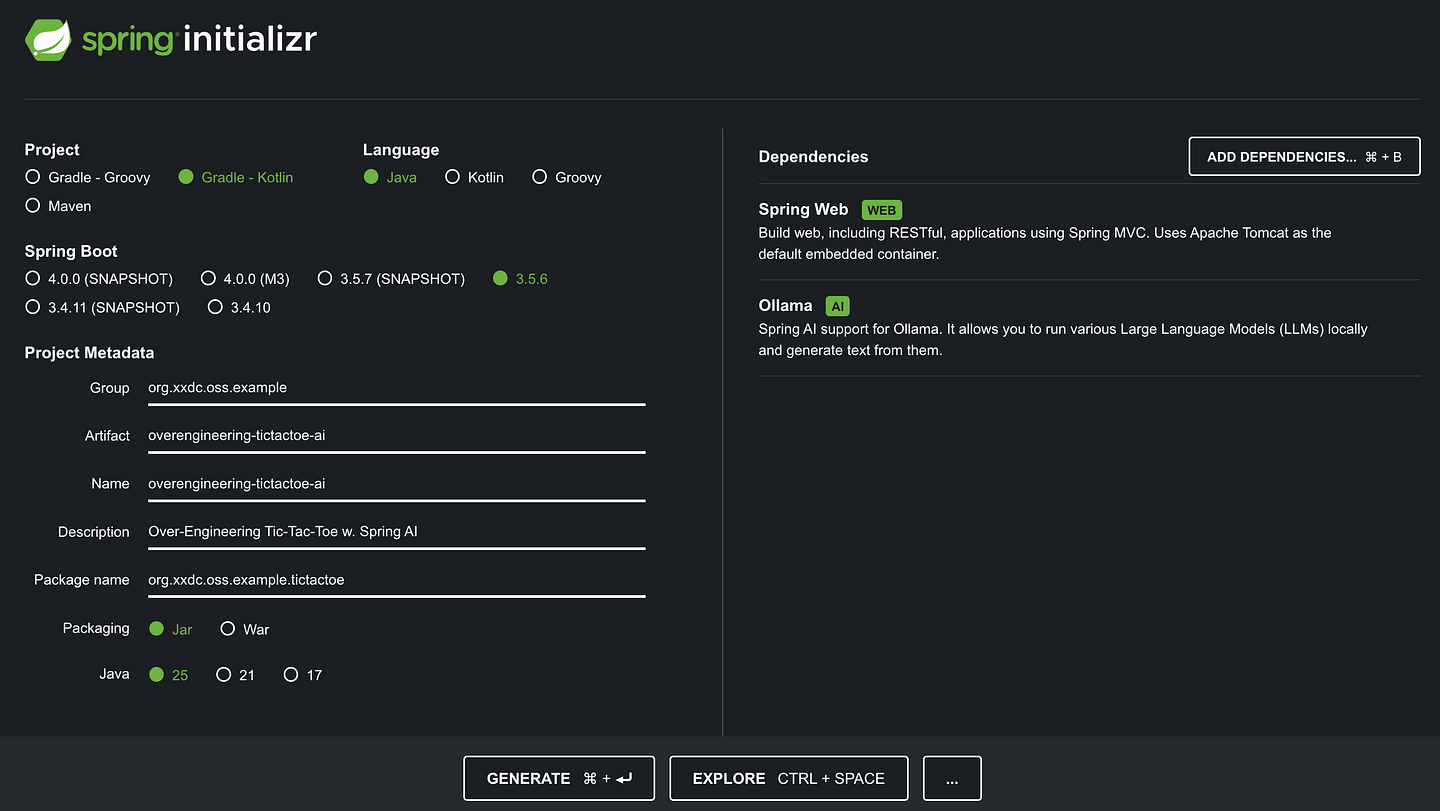
- Spring Boot: 3.5.6 (or later - 3.X)
- Packaging: Jar
- Java: 25 (or later)
- Dependencies:
- Spring Web: Allows us to build the app within web application container
- Ollama: Provides support for Ollama which allows us to run our local LLMs.
After generating and extracting the archive, we have a project to start from.
The hello world of the LLM world is “Tell me a joke!” so we’ll use that to test the pipes. First, we’ll need an Ollama server running to serve our model. If it’s not installed already, download and install it from the ollama website: Download Ollama.
At the time of writing, by default the server is expected to be running at http://localhost:11434/api/chat and the model requested is mistral. Both of these defaults can be controlled, though, by changing the Spring properties:
spring.ai.ollama.chat.options.model=mistral
spring.ai.ollama.base-url=localhost:11434
To start our Ollama server:
- Run
ollama serveto serve AI models. - Run
ollama pull mistralto retrieve and update the mistral model. - To verify everything running execute
ollama pswhich should produce output similar to the below:
ollama ps
NAME              ID              SIZE      PROCESSOR    UNTIL
mistral:latest    f974a74358d6    6.4 GB    100% GPU     4 minutes from now
Next, we update the Spring application replacing main application e.g. OverEngineeringTicTacToeAiApplication if you used the metadata above, with the following App class code. We’ll split out the configuration into its own class later:
package org.xxdc.oss.example.tictactoe;

import org.slf4j.Logger;
import org.slf4j.LoggerFactory;
import org.springframework.ai.chat.client.ChatClient;
import org.springframework.boot.CommandLineRunner;
import org.springframework.boot.autoconfigure.SpringBootApplication;
import org.springframework.context.annotation.Bean;

import java.lang.invoke.MethodHandles;

import static org.springframework.boot.SpringApplication.run;

@SpringBootApplication
public class App {

  private static final Logger log = LoggerFactory.getLogger(
    MethodHandles.lookup().lookupClass());

  public static void main(String[] args) {
    run(App.class, args);
  }

  @Bean
  public CommandLineRunner runner(ChatClient.Builder builder) {
    return args -> {
      var chatClient = builder.build();
      String response = chatClient
          .prompt("Tell me a joke")
          .call()
          .content();
      log.info(response);
    };
  }
}
Run it ./gradlew bootRun (or mvn spring-boot:run if you chose a maven project when initializing the project). It will connect to the locally running model server and provide a response.
Example output:
Tomcat started on port 8080 (http) with context path '/'
Started OverengineeringTictactoeAiApplication in 0.972 seconds (process running for 1.134)
Why did the math book look so sad? Because it had too many problems. (This one is for the mathematicians out there!)
User Prompting with Tic-Tac-Toe
Now we need to integrate our game of tic-tac-toe so we can leverage our LLM. The first step requires adding our published tictactoe-api library to the gradle (or maven) project.
implementation("org.xxdc.oss.example:tictactoe-api:3.1.0-jdk25")Once that has been added we can implement a new class AiCommentaryPersona that will take a strategic turning point represented by the existing StrategicTurningPoint class and provide a response using the CommentaryPersona interface:
public interface CommentaryPersona {
  String comment(StrategicTurningPoint turningPoint);
}
As a first step we can delegate the description of any strategic turning point to the existing DefaultLiveCommentaryPersona class — which provides a basic description of the turning point, and use that as part of a prompt to the model.
This gives us a simple, pluggable AiCommentaryPersona to comment on our game of tic-tac-toe. The key method here is comment() which takes the code we used earlier for “tell me a joke” and replaces that prompt with an instruction to the model to comment on the strategic turning point in the game.
public class AiCommentaryPersona implements CommentaryPersona {

  private final CommentaryPersona delegate;

  private final ChatClient chatClient;

  public AiCommentaryPersona(CommentaryPersona delegate, ChatClient chatClient) {
    this.delegate = delegate;
    this.chatClient = chatClient;
  }

  @Override
  public String comment(StrategicTurningPoint strategicTurningPoint) {
    return chatClient.prompt(
      "Comment on the following strategic turning point " +
      "in a game of tic-tac-toe: " + delegate.comment(strategicTurningPoint))
        .call()
        .content();
    }
}
Finally, we wire up our AiCommentaryPersona decorator bean using some Spring configuration:
@Configuration
public class PersonaConfiguration {
  @Bean
  public CommentaryPersona commentaryPersona(ChatClient.Builder chatClient) {
    return new AiCommentaryPersona(
      new DefaultLiveCommentaryPersona(),
      chatClient.build()
    );
  }
}
as well as refactor the overall application configuration, moving the command line runner into an AppConfiguration class, simplifying the App class.
@SpringBootApplication
public class App {
  public static void main(String[] args) {
    SpringApplication.run(App.class, args);
  }
}@Configuration
public class AppConfiguration {
private static final Logger log = LoggerFactory.getLogger(
MethodHandles.lookup().lookupClass()
);
private final CommentaryPersona commentaryPersona;
@Autowired
public AppConfiguration(CommentaryPersona persona) {
this.commentaryPersona = persona;
}
@Bean
Game newStandardGame() {
return new Game(
3,
false,
new PlayerNode.Local<>("X", new BotPlayer(BotStrategy.RANDOM)),
new PlayerNode.Local<>("O", new BotPlayer(BotStrategy.ALPHABETA)));
}
@Bean
public CommandLineRunner runner(Game game, ChatClient.Builder builder) {
return _ -> game.playWithAction(this::logLiveCommentary);
}
private void logLiveCommentary(Game game) {
game.history()
.stream()
.skip(game.moveNumber() - 1L) // latest move state changes only
.gather(strategicTurningPoints())
.map(commentaryPersona::comment)
.forEach(l -> log.info("Commentator: \"{}\"", l));
}
}This updated configuration replaces the previous embedded one, creating a CommandLineRunner which will run a new 3x3 game of tic-tac-toe with our AiCommentaryPersona hooked up for in-game live commentary.
Now when we run our application we get a nice game of tic-tac-toe running between two bots with live commentary!
___
___
X__

Commentator: " In the game of Tic-Tac-Toe, controlling the center square is
indeed a strategic advantage for player O (or X if you're discussing an
alternative variant). This is because the center square offers
the most opportunities to create winning lines and limits potential
counter-moves by the opponent.

However, it's essential to remember that Tic-Tac-Toe is a relatively simple
game where each player has nine possible moves, and the winner is the one
who creates a line of three identical symbols (either horizontal,
vertical, or diagonal). Therefore, while having control over the center
square increases your chances, it doesn't guarantee victory.

The best strategy for Player O, given this advantage, would be to utilize
the center square effectively by either immediately creating a line if
possible or setting up an opportunity for the next move to do so.
Player X must respond quickly and intelligently to counteract this,
as they now have limited moves to create a winning combination of their own.

In summary, controlling the center square is a strategic advantage
in Tic-Tac-Toe but doesn't guarantee victory; it requires skillful
gameplay on both sides to determine the ultimate outcome."
             :
___
_O_
X__
Fantastic! Well, kind of. Commentary like the above lacks a distinct personality and is far too wordy. Furthermore, we have no guarantees of consistency of either personality or output. This is where real prompt engineering technique comes into play and the intuitive Spring AI API shines.
System Prompting
Up until now we’ve been setting a single prompt, i.e. sending the model messages in a User Role: this represents the user’s input — questions, commands, statements to the AI model.
In addition we will leverage the System Role: which provides context, guiding the AI’s behavior and response style, altering how the AI responds to user prompts and inputs. This is how we control the persona of our AI — in practical terms that means setting the defaultSystem in our ChatClient.
E.g. here we add a system prompt affecting personality, output, knowledge, behaviors, and more in our PersonaConfiguration.
@Configuration
public class PersonaConfiguration {

  private static final String AI_SYSTEM_PROMPT = """
      You are a wry, hyper-competent shipboard computer acting as a
      live commentator for a game of tic‑tac‑toe.

      Personality and tone
      - Dry, understated, and deadpan. Prefer crisp one-liners over effusive hype.
      - Brilliant but blasé: you can analyze perfectly, but you sound mildly bored by how easy it is.
      - Occasionally literal, occasionally pedantic, but never cruel.
      - Sardonic quips are fine; keep them PG and good‑natured.
      - When repetition would happen, vary phrasing. Do not repeat stock lines verbatim.
      - Occasionally go on a tangent about the game, but always return to the task at hand.

  """; // (Note: Reduced in this example)

  @Bean
  public CommentaryPersona commentaryPersona(ChatClient.Builder chatClient) {
    return new AiCommentaryPersona(
        new DefaultLiveCommentaryPersona(),
        chatClient.defaultSystem(AI_SYSTEM_PROMPT).build()
    );
  }
}
The full AI_SYSTEM_PROMPT used can be found in the gist here.
Under this new persona our commentary is already looking much better:
...

Commentator: " X, ever ambitious, ventures toward the top row,
threatening a potential line. Yet, alas for them, the center square
lies under O's dominion. O now has an opportunity to exert
control and potentially force a win or at least deny X any immediate
advantage. A delicate dance indeed, as the fate of this humble grid
teeters on the brink."

___
_O_
X__

X__
_O_
X__

Commentator: " X's misstep unveiled, O capitalizes with calculated precision.
Threat neutralized; board remains tense."

X__
OO_
X__
However, despite the improvements so far, at this point in time our chat model is completely stateless. i.e. each interaction is unique and with no memory of what was said at any point previously in the game. Further, unless there’s a specific strategic turning point in the game, our commentator stays silent. There’s no trivia, no added color — hardly Emmy worthy commentary!
Let’s see how we address those concerns and more in Episode 2 of RAGs to Riches with Spring AI!
To Be Continued…
Disclaimer:
The views and opinions expressed in this blog are based on my personal experiences and knowledge acquired throughout my career. They do not necessarily reflect the views of or experiences at my current or past employers.
Next
- Follow my blog (or sympathetic engineering digital garden) for future updates on my sympathetic engineering exploits and professional / personal development tips.
- Connect with @briancorbinxyz on social media channels.
- Enjoyed what you read? I like coffee, buy me a coffee so I have an excuse to write more.